Summarize this text with artificial intelligence
Choose your preferred tool to generate a short summary of the text.
Shopify is one of the fastest and easiest platforms for those who want to sell. Moreover, it is much more logical and sustainable compared to many marketplaces. A website where you are in full control and you set all the rules.
Standing out in marketplaces can sometimes be quite difficult. In addition, the strict rules of marketplaces and many issues such as sales and brand awareness can prevent you from growing your business.
When you sell on Shopify, however, you have complete control. This provides a much more open-to-development and flexible working system.
So, how to sell with Shopify, what are its pros and cons? All the answers you are looking for are in the continuation of our article!
How to Sell with Shopify? - Selling on Shopify in 10 Steps
1. Sign Up for Shopify's Free Trial
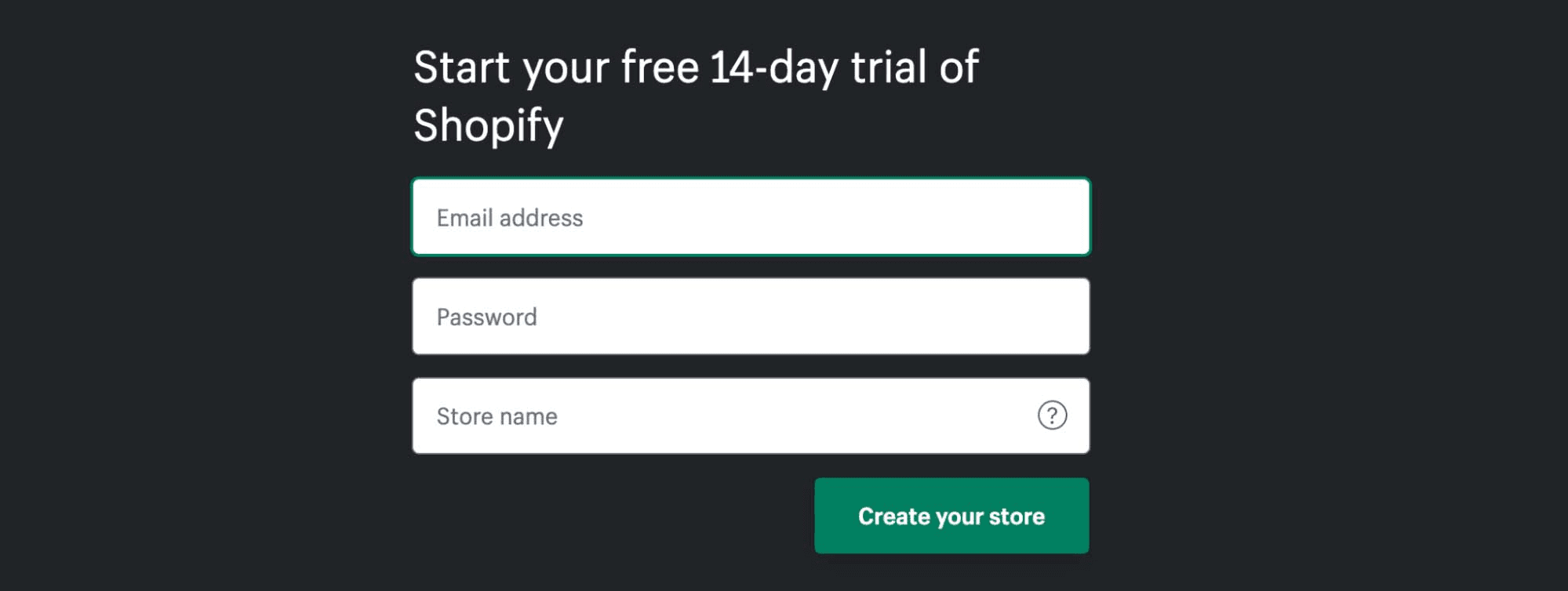
You can learn how to sell on Shopify completely risk-free for 14 days, and this includes all the benefits that Shopify has to offer.
During the free trial period, you can open your online store, sell in person and on social media sites, and explore other sales channels.
2. Choose Your Sales Channels
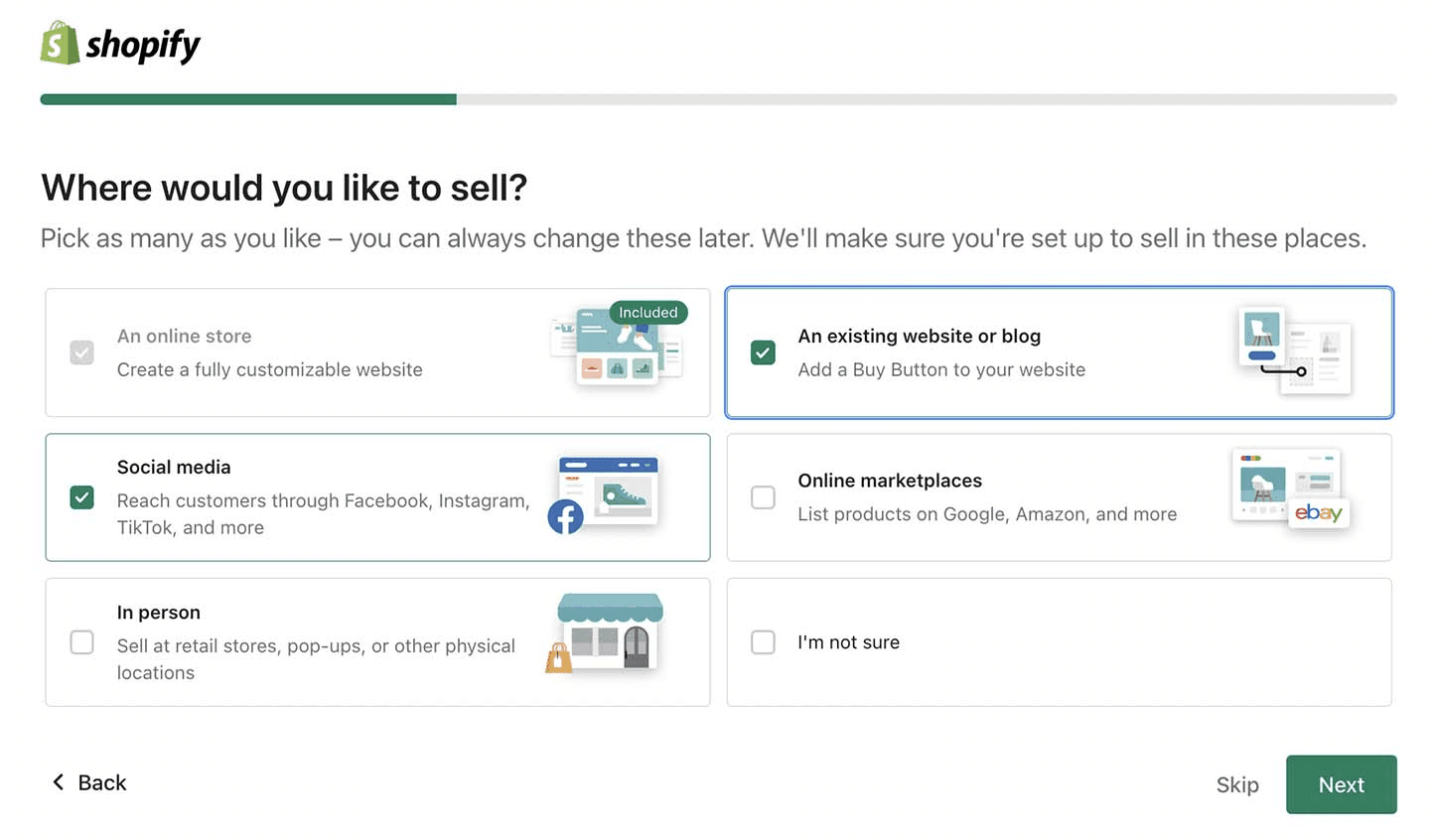
After signing up, Shopify's quick-start wizard opens to help you set up the basics. Shopify automatically gives you an online store, but this is just one of many ways to sell on Shopify.
You can connect to other sales channels, such as social media sites and in-person sales, through this screen. The quick-start wizard also helps you connect Facebook, Instagram, Pinterest, and TikTok to your Shopify dashboard.
Don't be afraid to explore your sales channel options on Shopify; you can change your selections at any time under the sales channels tab in your Shopify dashboard.
3. Choose Payment Methods
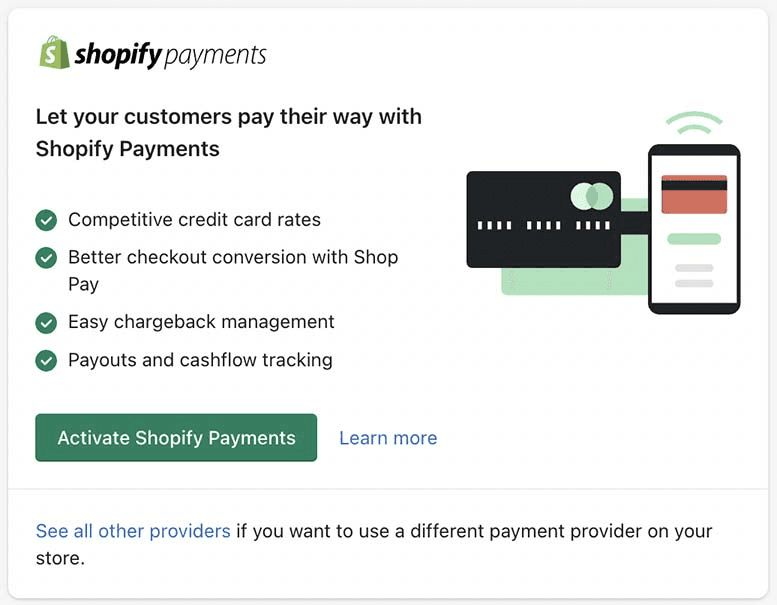
You can activate Shopify Payments in the quick-start wizard to accept credit cards, debit cards, and in-person payments with flat-rate transaction fees.
Or, you can connect your own credit card processor instead, but Shopify charges a separate transaction fee if you choose this route.
If you are selling in person, you can also add manual payment methods like cash and check. Click the payments tab under settings to add or edit your payment methods at any time.
4. Create Collection Pages
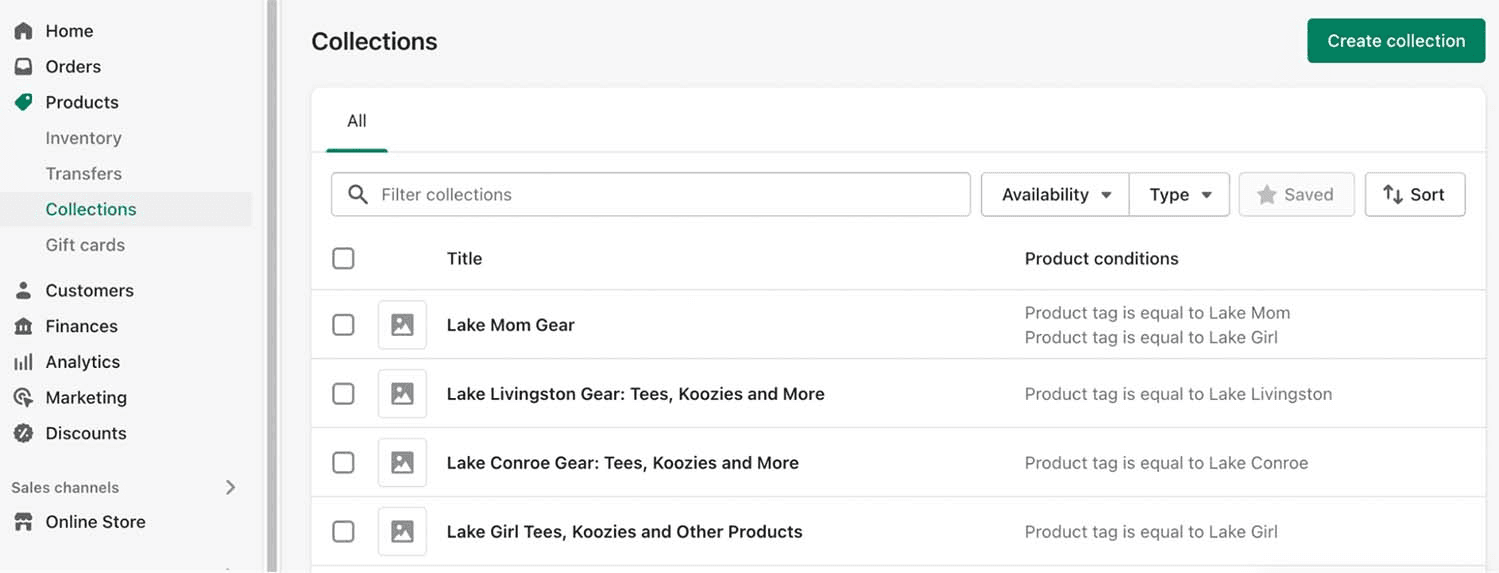
Collections help you organize products, and you set them up in the Collections tab under Products in your Shopify dashboard. Write a title and a short description for each collection to help with search engine optimization (SEO). As you add products to your Shopify store, collection pages can self-populate using tags or other product details.
5. List Your Products
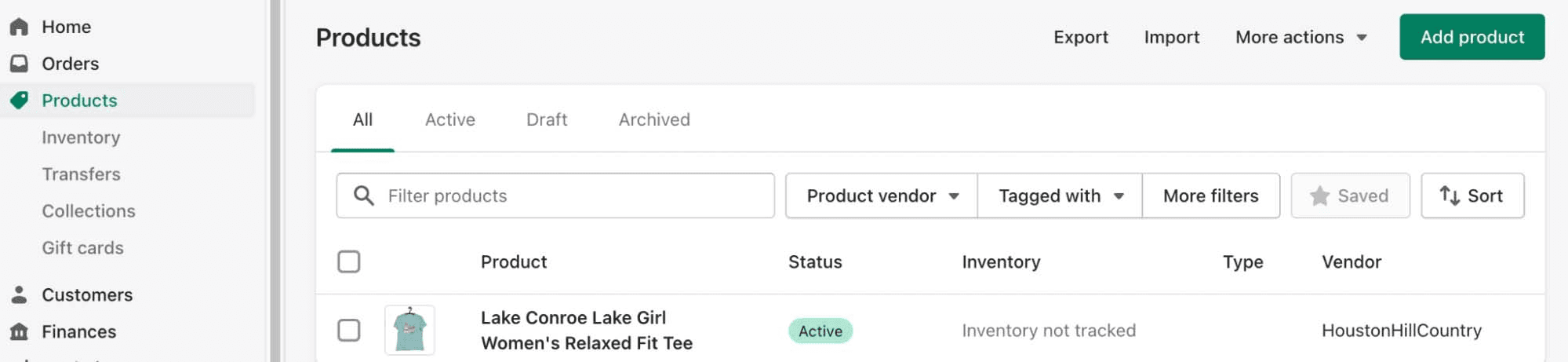
You can sell all kinds of products through Shopify's versatile platform. If you already have products or services to sell, you can enter them by clicking the add product button under the products tab in your Shopify dashboard.
6. Enter Product Details
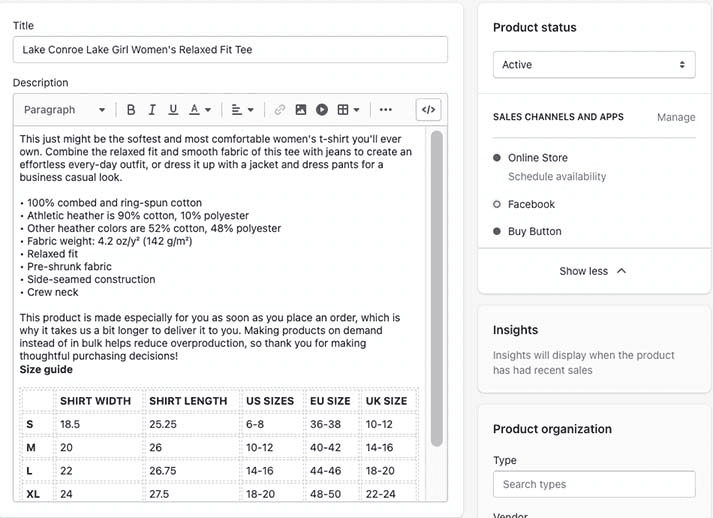
You must enter the product details for the products you add to Shopify. On Shopify's product details screen, you can enter:
Item title: Enter a descriptive item name that will appear on your Shopify store's pages, sales channels, and search results.
Item description: Enter a detailed description of your item with features, benefits, and size charts or option lists.
Photos and videos: Showcase product features and details with images, videos, and 3D model files.
Pricing: Enter your retail price, compare-at price, and track your product cost.
Inventory data: Add product stock keeping unit (SKU), product barcode, stock quantity, and where it is sold or shipped from.
Shipping data: Enter product weight to print shipping labels and customs details for international sales.
Product options: List all options customers can choose from, such as size and color.
Item page SEO: Customize a short product listing snippet to help with search engine optimization (SEO).
Select sales channels: Choose where you want to display and sell each product.
Organize products in your store: Use item type, tags, and vendor details to automatically populate collection pages and improve store search capabilities.
7. Set Up Your Shopify Online Store
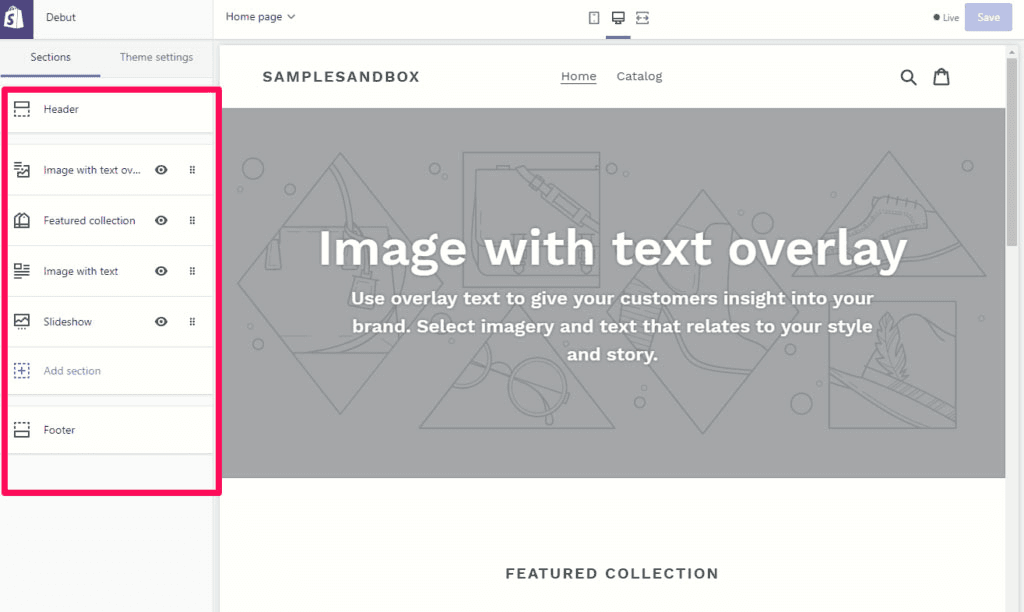
After setting up a few collections and products in your Shopify dashboard, you are ready to create your online store.
Choose a theme for your store: Shopify assigns a default theme, but you can change this with your choice of nine free themes or purchase hundreds of paid premium themes.
Customize theme settings: To personalize your store, go to the theme settings tab. You can quickly change colors and fonts to make your store your own. Over time, you can explore other options like adding new block sections to your homepage and creating blog content.
Edit store header: Select the header feature to edit the content that appears at the top of each page of your store. This is where you edit your store name font or add your logo.
Customize your homepage: The versatile homepage is built using sections like slider images, collection collages, contact forms, and featured products. All themes already have homepage sections for a quick launch.
Set up policy pages: Shipping, return, and privacy policy pages help set shopper expectations. You can add them using the pages tab under online store.
Create store menus: Go to the navigation tab under online store to set up store menus. For a quick start, populate your header menu with product collections and add policy pages to your footer menu. These are easy to edit as your store expands.
Edit site footer: Select footer to edit the content that appears at the bottom of each page of your store. This is an ideal place for contact information, an email list sign-up, and a menu with links to policy pages.
Set up SEO details: Customize your store's SEO title and meta tag in preferences under the Online Store tab.
8. Add Your Domain Name
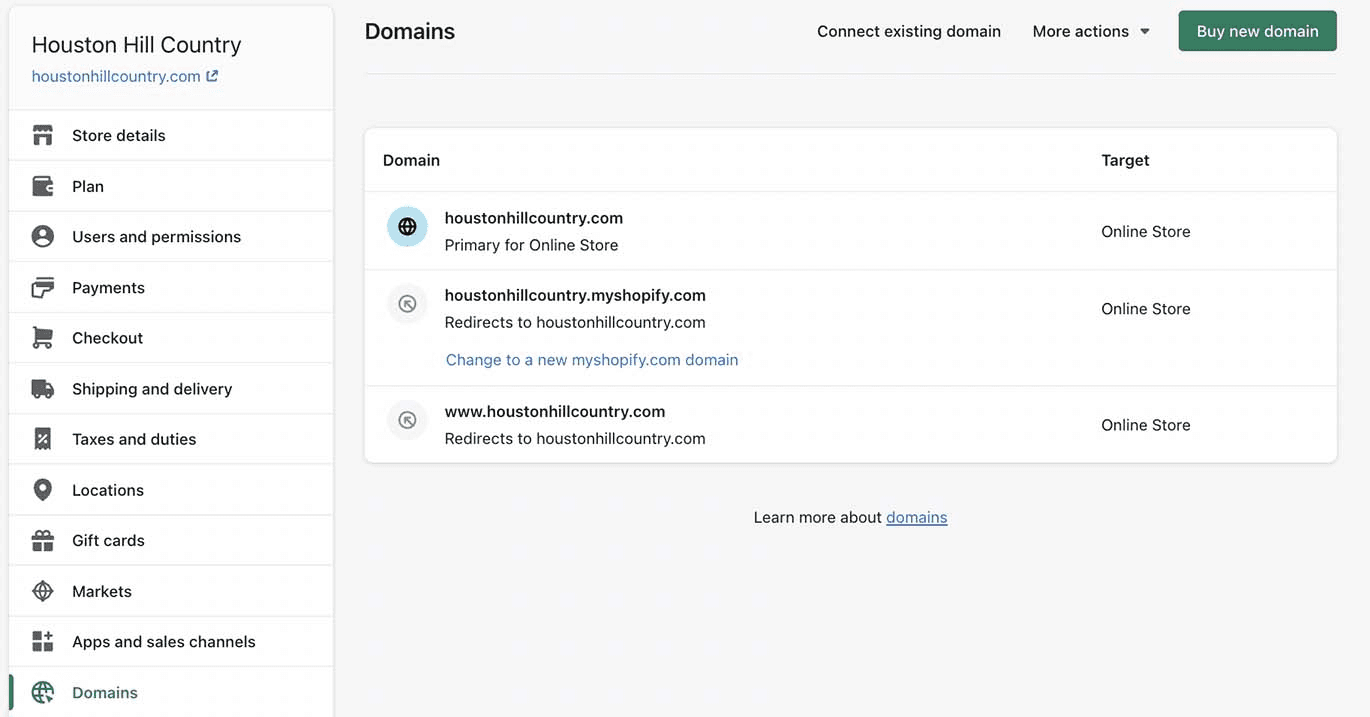
Connect a custom domain: By default, Shopify store URLs appear as https://storename.myshopify.com. You can add a custom domain like yourstorename.com in the domains tab under settings. You can purchase a domain name through Shopify or connect your own domain name registered with GoDaddy, BlueHost, or other domain registrars.
9. Set Up Shipping Integration
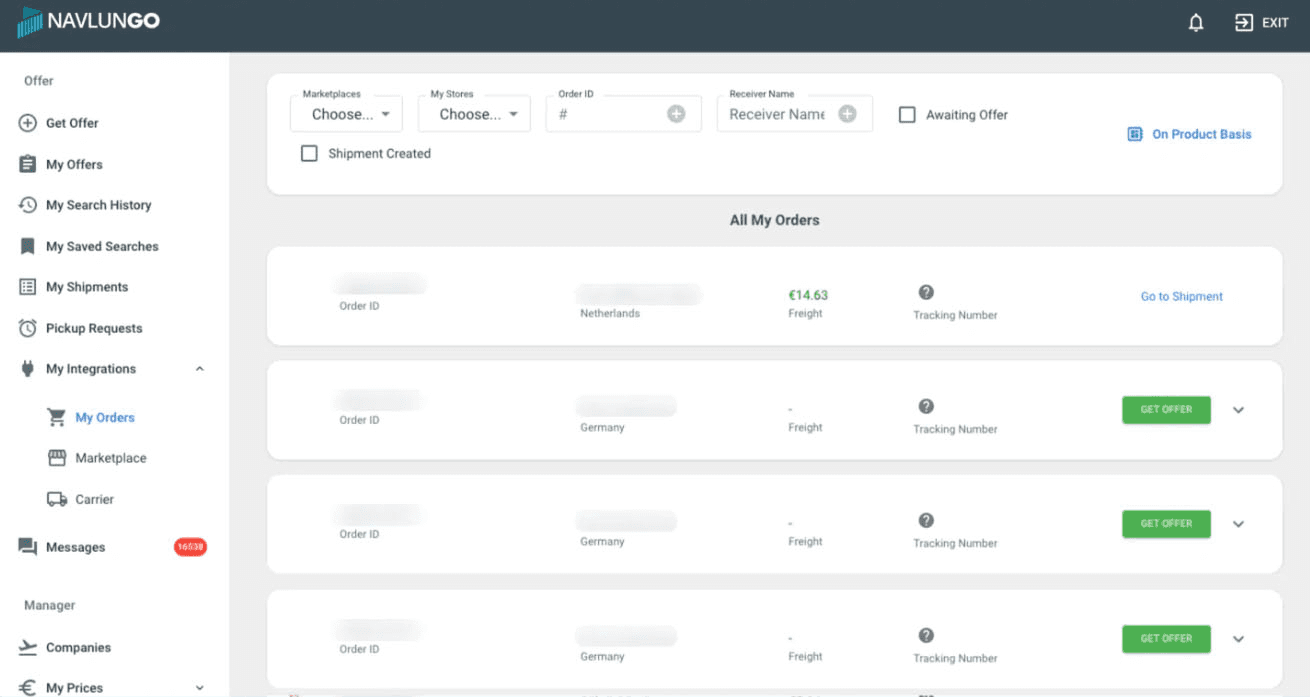
You must set up a shipping integration to sell on Shopify, ship your orders, and track the process. By using the Navlungo Shopify integration, you can send all your orders with the cheapest shipping rates, and track order control and customs document transactions through a single panel.
10. Place a Test Order and Launch Your Store
Now you are ready for the final step in Shopify's online store setup, and the final step is to place a test order. Once this is completed and the order appears in your store, you are ready to go live.
To launch your store, you will need to choose a Shopify plan, but you can sell products during your 14-day free trial. You will not be charged until your trial period ends.
Which Membership Package Should I Choose on Shopify?
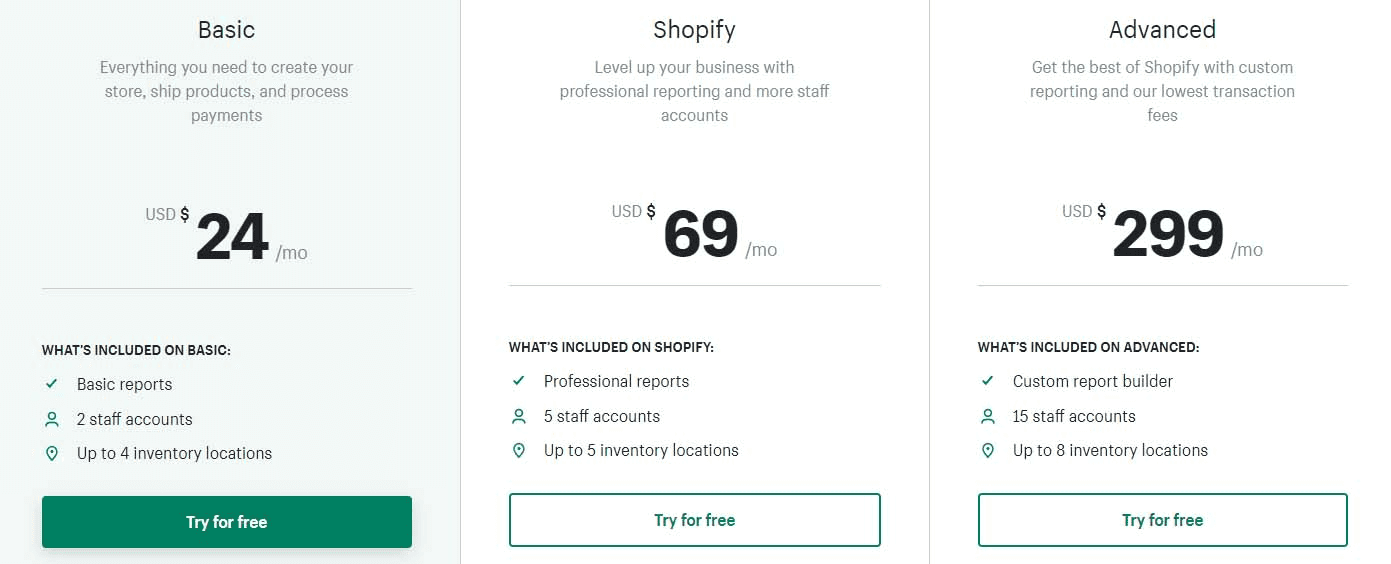
Shopify works with a monthly fee, that is, a subscription system. Basically, Shopify offers 3 subscription packages. Each of these subscriptions has different features and appeals to a specific audience. So, which one is right for you? Let's analyze.
What is the Shopify Basic Plan?
Basic Shopify gives you your own storefront hosted by Shopify and is a great plan to start with. It is the cheapest pricing plan for those with a wide range of products.
Shopify does not limit the number of products or file storage space. So you can offer as many products as you want, whether physical or digital. This plan also includes advanced features like emailing shopping cart abandoners, gift cards, and a multi-language store. Email, chat, and phone support are also available.
However, credit card rates (2.9% + 30 cents) and transaction fees (2%) are higher in this plan compared to Shopify and Advanced plans. In addition, features like professional reports and third-party calculated shipping rates are not included.
What is the Shopify Mid-Tier Plan?
The plan called Shopify is a pretty big leap from the previous plan. However, it has a lower credit card rate (2.6% + 30 cents) and transaction fee (1%). It provides more features, such as professional reports, which provide more information about your online store and make analysis easier.
It is also more suitable for international selling, as it includes country-specific domain names (if you want to use different domain names in different regions) and percentage-based international pricing.
What is the Shopify Advanced Plan?
Advanced Shopify is instructions for standard stores the most expensive pricing plan. However, it has the lowest credit card payment rate (2.4% + 30 cents) and transaction fee (0.5%). It also provides the best shipping conditions for the US.
This plan is the only option if you have accounts with third-party shipping companies and want to offer these prices to your customers.
Also, since it allows you to set separate prices per country/region, it is the best option for international sales. It also has an advanced report builder that allows you to customize your own professional reports.

How Much Capital is Required to Sell with Shopify?
The capital required to sell on Shopify is entirely up to you. After choosing any Shopify plan, there will be nothing else you need to pay extra for.
If you are considering choosing advertising channels like Facebook, Instagram, and Google to market your products, you should set aside a budget for this.
In other words, you basically need a capital of 24 dollars to sell on Shopify.
Why Should You Sell with Shopify?
Having become an important player in the online shopping ecosystem since its establishment in 2006, Shopify is one of the strongest marketplaces with 457 million buyers ordering products every year.
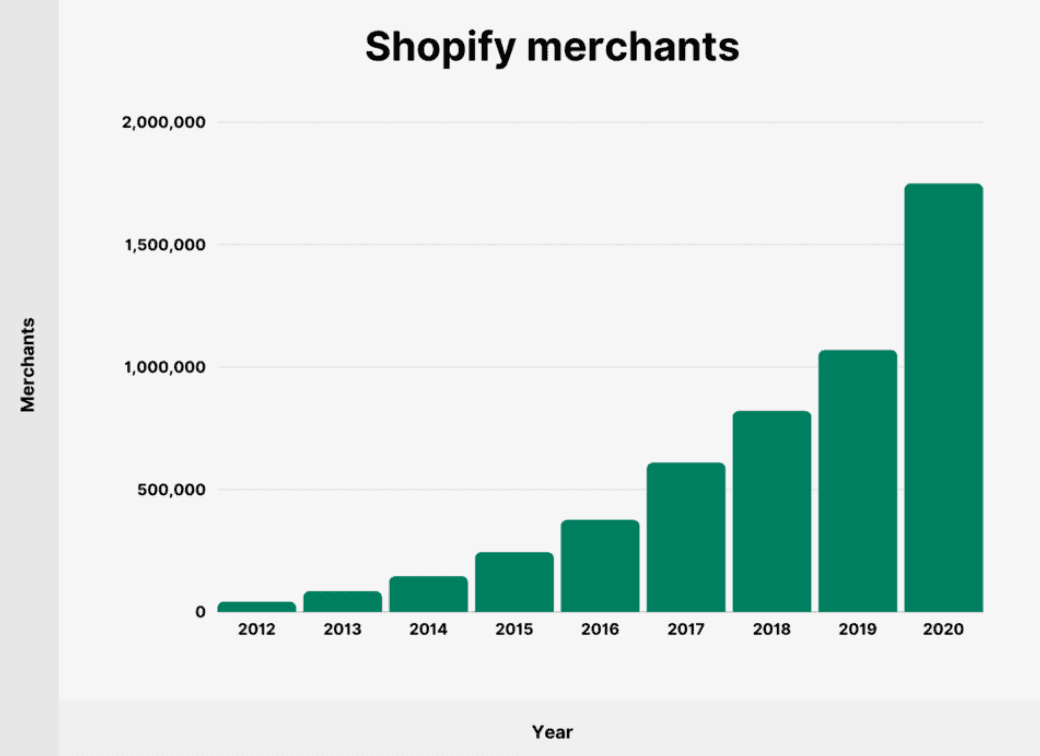
The platform, which hosts the online stores of 1.75 million sellers, generated 2.1 billion dollars in revenue in 2021 alone, reaching an order value of 79.5 billion dollars.
In the table below, you can examine the growth chart of online merchants selling through Shopify over the years:
The number of stores and online merchants increasing every year is, of course, directly proportional to the increasing demand and number of customers. The graph below presents the increasing trend in the number of customers shopping online via Shopify by years:
Growing year by year and reaching a dramatic market volume, more than half of which is in the US, Shopify serves as a critical intermediary for businesses that want to turn the face of online trade more towards the world to appeal to large markets.
Can You Sell from Turkey with Shopify?
Users who want to sell from Turkey with Shopify can do so. You can make both your domestic and international sales with the Shopify infrastructure. In other words, when you open your store, it is also possible to sell in Turkey with Shopify.
Especially for anyone who wants to sell abroad, the Shopify infrastructure is highly functional. Shopify makes it possible to sell in many countries. You can create your store in multiple languages and sell to customers in different countries and regions.

How to Receive Payments from Turkey with Shopify?
With Shopify, you can receive payments from Turkey through many methods. This is directly proportional to the payment methods you accept. You can receive the payments for your Shopify sales directly into your bank account.
Apart from bank accounts, you can also receive payments through payment methods such as Apple Pay, Amazon Pay, Meta Pay, Google Pay. In short, receiving payments with Shopify Turkey is easy and convenient.
Pros of Using Shopify
Shopify is one of the best e-commerce platforms. Here are some of the reasons why users choose Shopify:
• Easy to use
• Customer support
• Multiple payment methods
• Variety of themes
• Plugin support
Cons of Using Shopify
You will agree with me when I say that everything that has an advantage also has disadvantages. And this article aims to weigh the pros and cons of Shopify so you can make an informed decision. At this point, if the disadvantages are important to you, it would be good to research topics like selling on Amazon as well.
We talked about the pros of Shopify, now let's learn about the disadvantages of the platform.
• Pricing
• Content marketing challenges
• Limited customization
• Missing data during infrastructure changes

How Do You Manage Your Incoming Orders from Shopify?
Getting support from prestigious shipping companies in the shipping and logistics process of your domestic and international orders coming through Shopify is important for your products to reach your customers on time and without damage.
In this regard, you can work with shipping companies one-on-one, or you can manage your international shipping processes with a solution-oriented digital logistics assistant.
Navlungo brings you the offers submitted for transport by successful international shipping companies in their fields on a single screen, allowing you to see all options together.
Thus, you can choose the most suitable competitive international shipping offer for your shipment and ensure that all processes are carried out under the leadership of Navlungo.
Moreover, with the Shopify integration rolled out by Navlungo, your orders coming to your Shopify store are transmitted to your Navlungo panel without you having to do anything.
After starting your process of receiving offers automatically via the panel, you can deliver your shipment to the courier who comes to your door or send your package directly to our warehouse with our contracted shipping companies.

We Asked the Expert: Recommendations for an Effective E-Commerce Strategy on Shopify
We asked Gürkan Ordueri, who has significant experience and success in e-commerce, digital marketing, dropshipping, and FBA processes, our questions for success specifically on Shopify. You can examine his answers below:
What are your recommendations for online merchants starting to sell on Shopify?
Shopify is a tool that is very easy to use at the beginning stage, and it won't take you more than a week to learn how to work with its dashboard. In this aspect, we can say it is extremely user-friendly.
The most important detail you will notice when you start using Shopify is that Shopify generally progresses through apps. It's important to realize this early because if you want to get full efficiency from Shopify, you must learn to install the right apps from the initial stage and integrate them quickly.
Another important issue is learning to read Shopify Analytics well. It is very important at this point for e-commerce companies, especially those transitioning from marketplaces to their own platforms, to use the data they acquire. In this regard, I strongly recommend you examine the KPI values in the Shopify Analytics section and improve yourself on these topics.
Could you share what should be especially applied or absolutely avoided while selling on Shopify?
Keeping your customers' expectations at the right level is always the most important issue. Sometimes, while focusing on sales strategies, promises regarding delivery or product criteria that are hard to keep can be made.
Unfortunately, every promise not kept results in a company at the scaling stage failing to ensure customer satisfaction and receiving return requests. Therefore, a company focused on LTV needs to pay attention to this.
Specifically on Shopify, products in which category are in greater demand?
There are over 1.7 million websites using the Shopify infrastructure. Therefore, it is a bit difficult to point out a single in-demand category on Shopify. However, we can say that the sectors dominating within e-commerce are also dominant here.
You know that shipping planning is a very important step in e-export. What advice would you give to sellers regarding shipping processes specifically on Shopify?
We can say that shipping time is not a major issue for products your customer cannot give up. However, nowadays, it is very difficult to define a product that the customer cannot do without, so shipping and shipping time are of great importance to get ahead of your competitors and increase the number of returning customers.
Therefore, no matter what product you sell, conducting feasibility and logistics infrastructure studies beforehand is extremely important.
Frequently Asked Questions About Selling on Shopify
What Can Be Sold with Shopify?
You can sell anything with Shopify, regardless of whether it is physical or digital.
How Much is the Shopify Fee?
Shopify offers 3 different subscriptions. These subscriptions are $25, $69, and $299 monthly, from lowest to highest.
Is PayPal Mandatory for Shopify?
PayPal is not mandatory to receive your payments with Shopify. You can add many payment methods to Shopify.
Does Shopify Provide Service in Turkey?
Yes, Shopify also provides service in Turkey. Those living in Turkey can create a store via Shopify and make sales.
Table of Contents
Furkan Aktas
All Posts


